


LineStar for DK
4.8633.00 Reviews
App Specs
- Version
- 3.7.0
- Updated On
- License
- Free
- Downloads
- 50,000+
- Developer
- BetFully, Inc.
- Categories
- Sports
- Platform
- Android
Screenshots
 Analysis by AppCompare
Shared-device use is worth thinking about before making LineStar for DK part of a household routine. I’d treat it as a personal research tool, not a shared fantasy account: one person can look up players while another follows along, but each should keep their own DraftKings decisions and sign-in details separate. That simple boundary makes collaboration easier without confusing whose lineup is whose.
A practical way to use it together
Imagine someone checking a slate during a short break before a game. They can use LineStar to compare players and review the suggested lineup, then talk through the choices with a partner or friend. The useful part is the discussion: one person may notice a matchup detail while the other has a stronger preference for a player. I’d use the app to inform that conversation, rather than treating its recommendation as an instruction to enter a particular contest.
For a shared phone or tablet, I’d avoid leaving an account open for the next person to use. A lineup research app can sit alongside personal financial and fantasy decisions, so it’s sensible to keep device access and account access distinct. If more than one person wants to follow the same slate, agree on who is making changes and who is only reviewing. That prevents accidental edits and avoids treating a shared screen as a shared account.
Keep the workflow deliberate
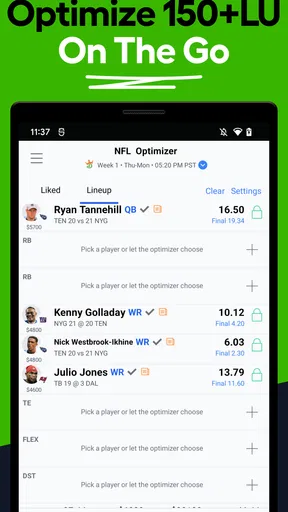
A useful routine is to check the available player information first, note a few candidates, and then use the lineup generator as a comparison point. If its suggested combination differs from your initial plan, look at the reasoning and decide whether the change suits your own approach. I find this more practical than repeatedly refreshing or rebuilding without a clear question in mind.
There’s also a meaningful trade-off between speed and judgement. Automated suggestions can help narrow a large field of choices, especially when time is tight, but they don’t remove the need to check late news or consider your own priorities. I’d leave a little time before submitting a lineup rather than relying on a last-second glance. That matters particularly when several people are discussing picks at once: settle on one person to make the final decision and verify the lineup before moving on.
Who will get the most from it
LineStar is most appealing if you already play DraftKings daily fantasy and want player information and lineup-building help in one place. It can also suit a newer player who wants a starting point for comparing options, provided they’re willing to learn what the projections mean instead of following them blindly. The app is free to install, has an Everyone content rating, and is made by BetFully, Inc.; those details make it straightforward to explore, though fantasy participation itself still calls for sensible personal limits.
If you only play occasionally, a manual lineup and the information you already use may be enough. Likewise, anyone looking for a general sports news reader, a season-long fantasy manager, or a tool for a fantasy platform other than DraftKings should look elsewhere. LineStar’s appeal is tied to its specific DFS workflow, so it is less useful when that is not how you follow sports.
Worth Reading Before You Choose

Flipboard Shows What News Apps Must Do Beyond the Feed

Switching to Android Auto Means Rethinking Your Driving Routine

Google Calendar Makes a Crowded Week Easier to Manage

Ludo King Makes the Most of the Minutes Between Plans

Baby Panda World Brings Quick Play to Modern Phones, but Its Game Library Feels Busy

ESPN’s Live Game View Makes Following Close Games Easier
How it fits beside other DFS tools
Compared with building every lineup by hand, the generator can save time and offer a second perspective on player combinations. Compared with relying only on a basic score or news feed, the projections and matchup information bring more decision support into the same workflow. The trade-off is that an optimizer can make a lineup look more certain than it is. A projection is a guide, not a promise, and historical matchup context shouldn’t outweigh current circumstances on its own.
One practical tip is to use the app to test a specific question: whether to keep a preferred player, which alternatives deserve a closer look, or how a different combination changes the lineup. That gives the tools a clear job and makes it easier to spot when the output doesn’t match your understanding. I’d also avoid assuming that more data automatically means a better decision; a concise, reasoned lineup can be more useful than endlessly comparing options.
If you’re weighing the paid features, decide what you need before spending. The app includes in-app purchases priced from $9.99 to $239.99 per item, so the range is wide enough that I’d check the purchase details carefully and consider whether the extra tools fit how often you play. Casual users can start without paying, while frequent players may find added analysis worthwhile if it genuinely improves their process. I wouldn’t treat a purchase as a guarantee of better results.
Age context matters in a household, too. The app’s Everyone rating describes its content classification, not whether every fantasy activity is appropriate for every person or permitted where they live. I’d make sure younger family members understand that projections are estimates and that contest participation involves choices with financial consequences. Adults should handle any account and payment decisions, and no one should assume that the app provides family controls or supervision tools.
The app has a long-running presence, having been released on October 21, 2014, and its current version is 3.6.4. It has a 4.7 average from around 1.9 thousand ratings, with more than 50 thousand installs. I’d read those figures as signs that people have tried it, not proof that its recommendations will suit every player. It requires Android 6.0 or later, and the same basic question applies on any device: does its DraftKings-focused workflow match the way you actually play?
Getting Started with LineStar
First things first, downloading and setting up LineStar for DK is a breeze. Available on both Android and iOS, just hit the download link and you’re off to the races. Once installed, the app welcomes you with a sleek interface that’s easy on the eyes and simple to navigate. Even if you’re new to DFS, you won’t find yourself lost in a sea of confusing options.
User Interface and Navigation
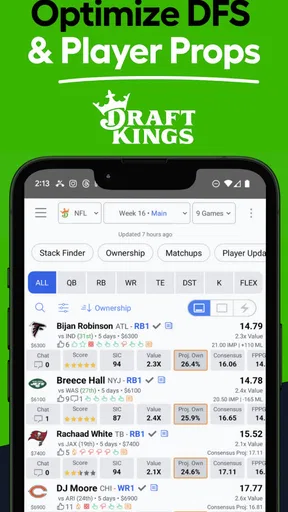
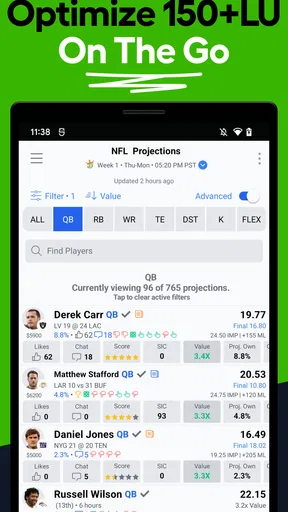
The app's design is intuitive. The main dashboard provides quick access to all the essential features, like player projections, optimal lineups, and recent news. Everything is categorized neatly, so you don’t have to dig through layers to find what you need. I particularly appreciated the search function, which lets you find players or teams in a snap.
Features That Make a Difference
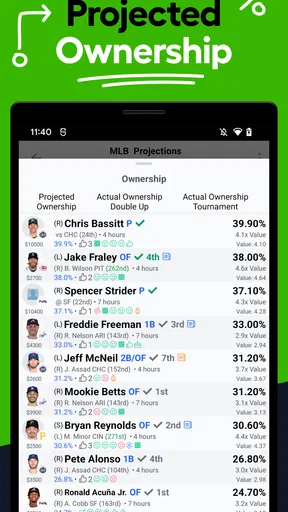
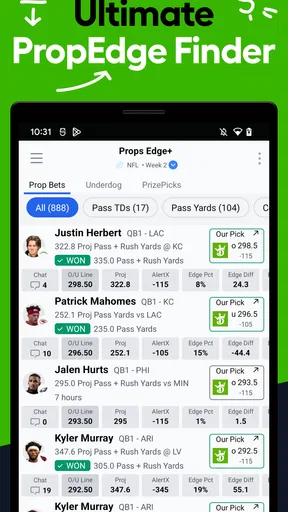
One of the standout features is the player projections. LineStar uses advanced algorithms to predict player performance, and honestly, it’s pretty spot on. You can see projections for points, assists, rebounds, and more. This is especially useful when you’re trying to decide between two players who seem equally matched.
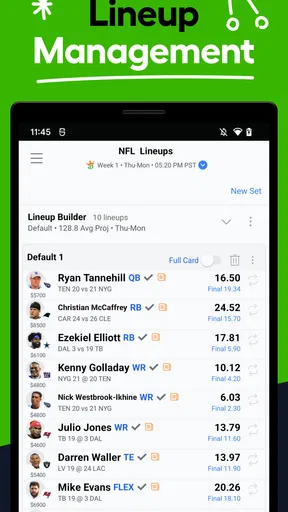
Another neat tool is the optimal lineup generator. If you’re short on time or just want to see how your picks stack up, this feature is a lifesaver. It suggests the best possible lineup based on current data and trends. You can customize it too, which is great if you have a few core players you want to keep in your lineup.
Insights and Analytics
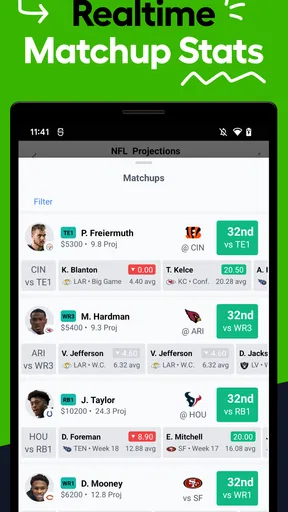
If you love data, LineStar has you covered. The app provides in-depth analytics that help you make informed decisions. From player stats to matchup breakdowns, you’ll find everything you need to make savvy choices. I found the matchup analysis particularly helpful; it shows how players have performed against specific teams in the past, which can be a game-changer.
Moreover, the recent news section keeps you updated on injuries and lineup changes. In DFS, being late on the news can cost you, so having this info at your fingertips is invaluable.
Community and Support
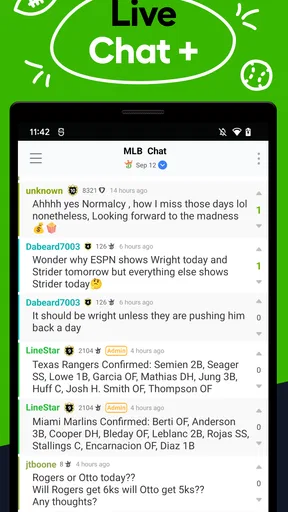
What’s cool about LineStar is its community feature. You can share insights and strategies with other users, which adds another layer of depth to the app. It’s like having a team of advisors right there with you. Plus, if you ever run into issues or have questions, their support team is responsive and helpful.
Performance and Reliability
In terms of performance, I’ve had no issues with lag or crashes. The app runs smoothly, even during peak times when everyone’s setting their lineup. Reliability is crucial in an app like this, and LineStar delivers.
Pricing and Value
LineStar offers both free and premium versions. The free version is robust enough for casual users, but if you’re serious about DFS, the premium features are worth considering. They unlock additional data and tools that can really enhance your experience. Plus, the subscription isn’t overly pricey, especially if you’re cashing in on your DFS games regularly.
To sum it up, LineStar for DK is a must-have for anyone who plays daily fantasy sports on DraftKings. It combines ease of use with powerful tools and data, making it a top choice for both beginners and seasoned players. Whether you’re looking to improve your game or just need a reliable app to streamline your lineup building, LineStar is definitely worth checking out.
Pros
- Real-time player updates enhance strategy.
- Customizable lineup options for flexibility.
- User-friendly interface for easy navigation.
- Detailed player stats aid informed decisions.
- Alerts for injury reports and lineup changes.
Cons
- Requires subscription for premium features.
- Occasional app crashes disrupt usage.
- Some features require a stable internet.
- Limited support for niche sports.
- Ads can be intrusive in free version.
FAQs for LineStar for DK
What is LineStar for DK, and how does it work?
LineStar for DK is a comprehensive app designed for daily fantasy sports enthusiasts, particularly those using DraftKings. It provides optimized lineups, player analysis, and real-time updates to enhance your gaming strategy. By leveraging statistical data and expert insights, it aims to help users make informed decisions and improve their winning odds.
Is LineStar for DK free to use?
LineStar for DK offers a free version with basic features, but to unlock advanced tools and analytics, users may need to subscribe to a premium plan. These paid options provide deeper insights and additional customization, enhancing the overall experience for serious players. It's advisable to check the app store for current pricing and subscription details.
What sports does LineStar for DK cover?
LineStar for DK covers a wide array of sports, including NFL, NBA, MLB, NHL, and more. It provides detailed statistics and analytics for each sport, allowing users to tailor their strategies according to the specific requirements of each game. This multi-sport support makes it a versatile tool for fantasy sports enthusiasts.
How accurate are the predictions provided by LineStar for DK?
While LineStar for DK utilizes sophisticated algorithms and statistical models to generate predictions, no app can guarantee 100% accuracy. The predictions are based on historical data, player performance, and other variables. Users should consider these insights as part of a broader strategy rather than relying solely on them for decision-making.
Can I use LineStar for DK on both Android and iOS devices?
Yes, LineStar for DK is available for both Android and iOS platforms. The app is designed to offer a seamless experience on both operating systems, providing the same range of features and functionalities. Users can download it from the respective app stores and utilize their accounts across different devices for convenience.


